WarRoom TradesEvery trade debriefed. Automatically.
Every paper trade is placed on the chart, with your plan in front of you. Trades writes the after-action report for every one, holds you to your session limits, and grows with the Academy: each lesson you learn adds what it teaches, and applies it to the trades you already took.
01 · Open
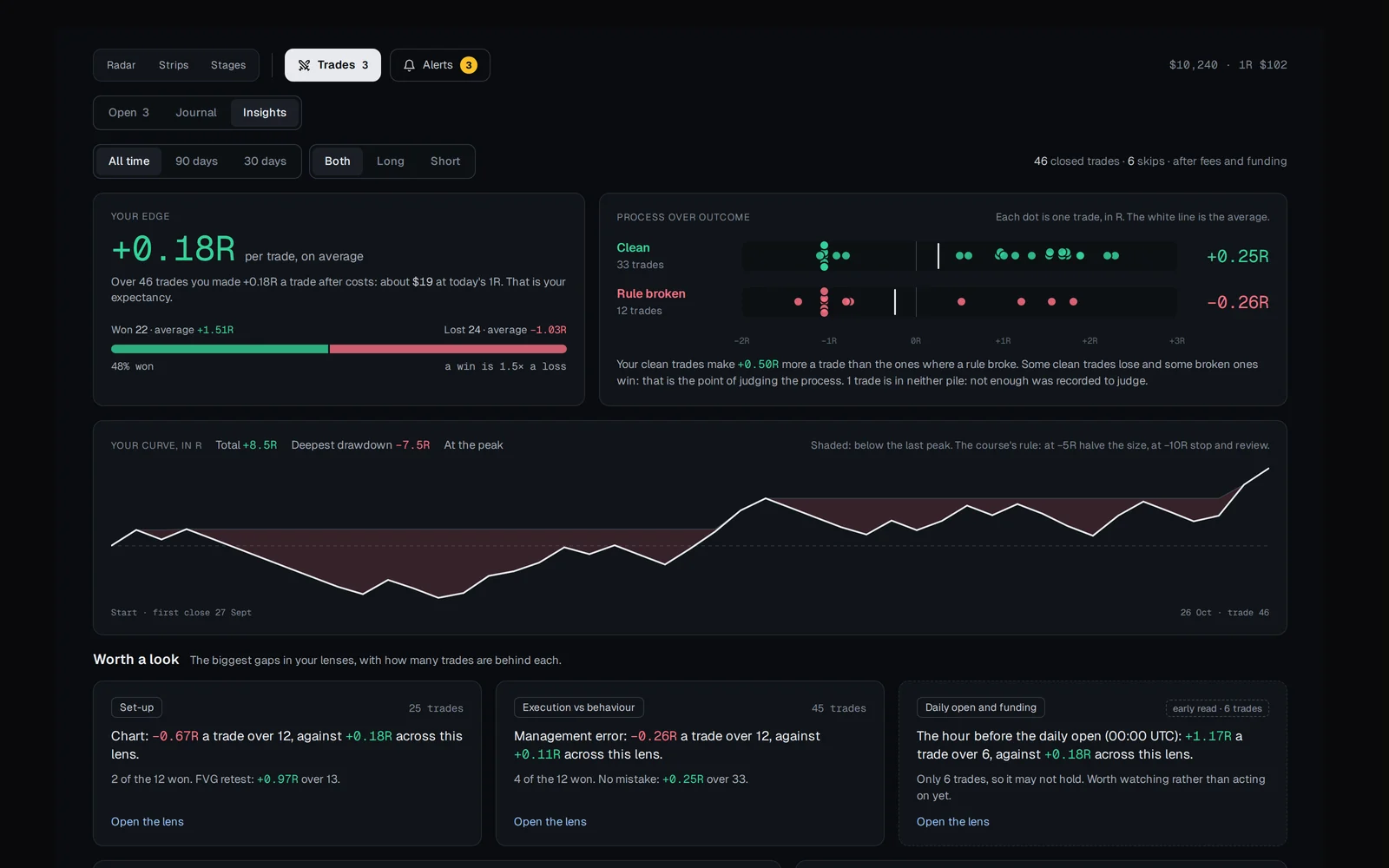
Every open trade from stop to target.
Each trade is a ruler from your stop to your target, with your entry and the price now, and the walls and gaps from the Watchtower in between. Above them, today’s session against your daily limit and the risk across all your open trades.
02 · Journal
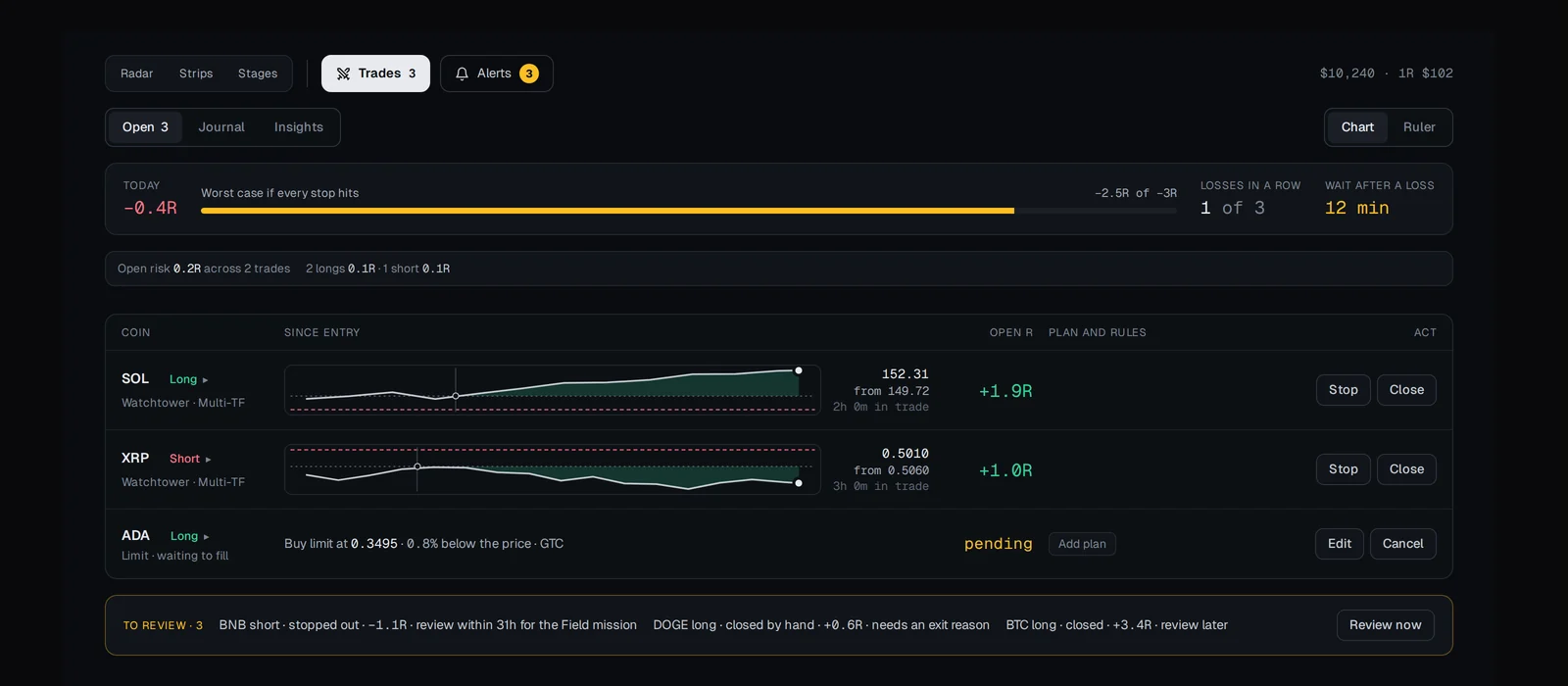
How you traded first, the result last.
Every closed trade lands in the journal by itself. Each entry starts with the verdict: clean or rules broken, the plan kept or not. Then the plan beside what happened, the market at entry, your review and, last, the result.
- Trades waiting for your review come first
03 · Insights
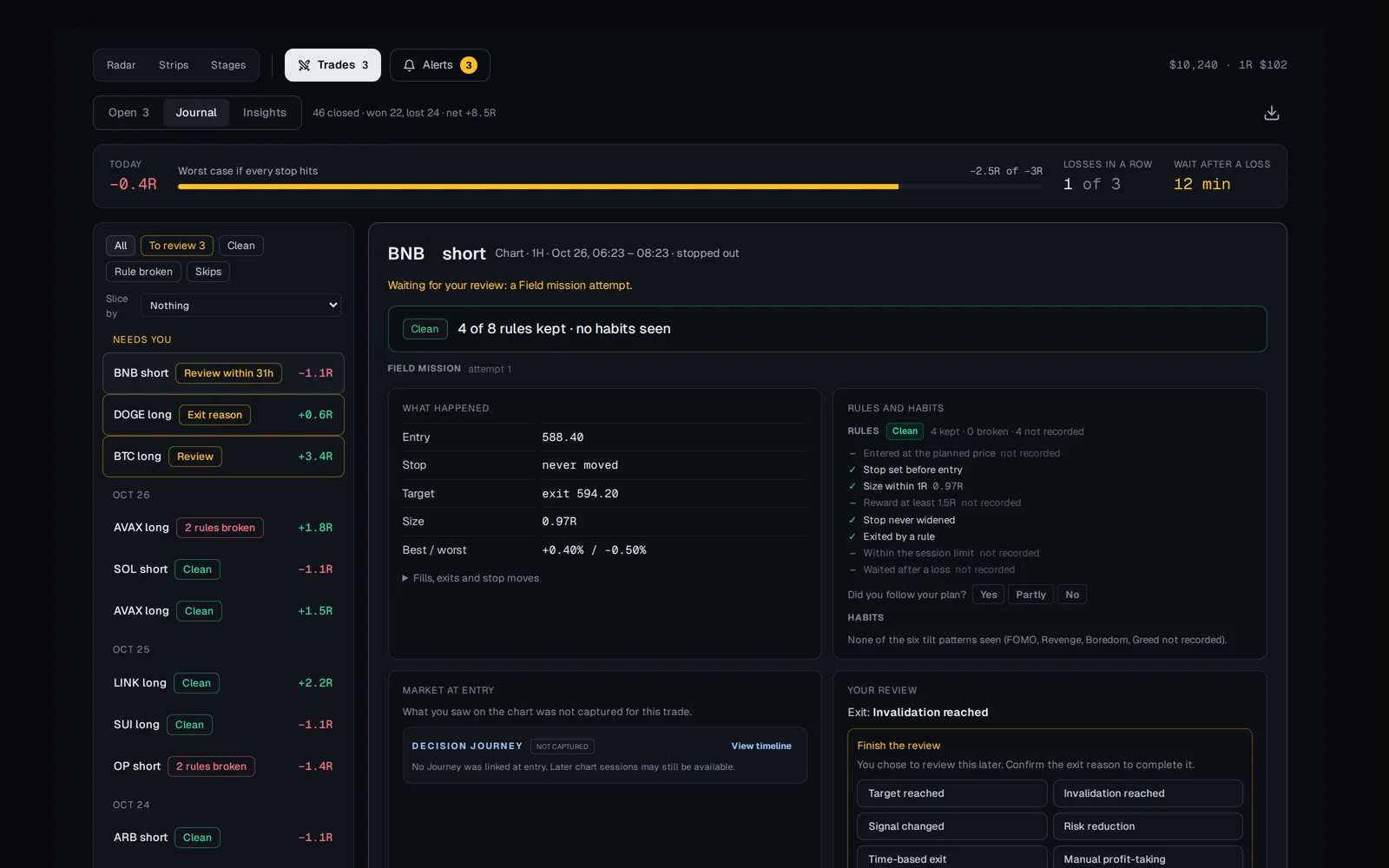
Your edge, from your own trades.
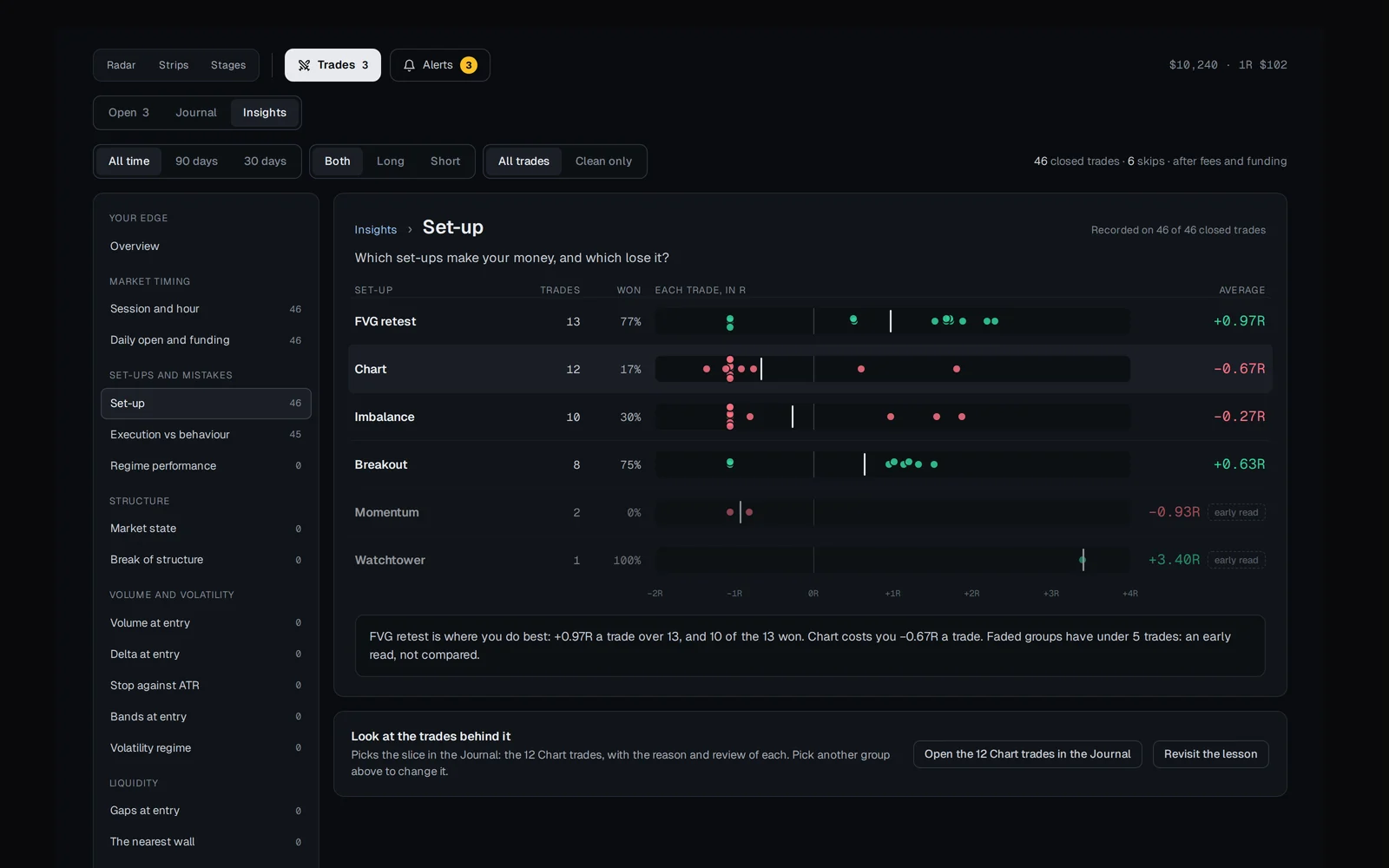
Your average R after costs, clean trades against rule-broken ones, your curve in R and the widest gaps across your lenses. Pick a lens, such as your set-up, to see which make you money and which lose it. Under 20 trades it says so, and shows the range your average likely sits in.
04 · Plan
Plan the trade on the chart.
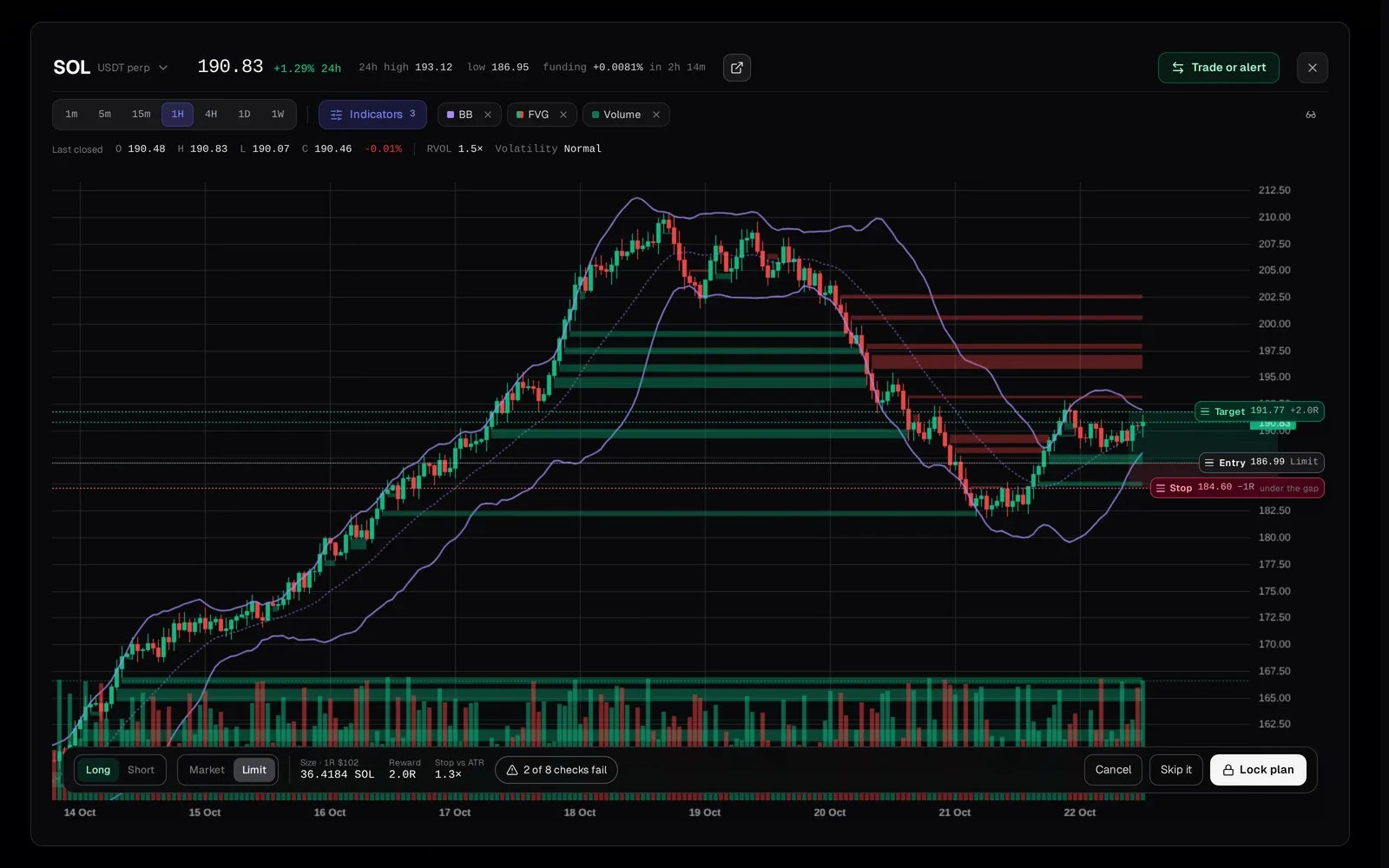
Drag the stop and target on the chart; the stop starts at the nearest wall, gap or swing beyond your entry. The strip under the chart shows long or short, market or limit, the size at your 1R, the reward in R and the checks. Lock plan stamps the time, and its checks appear as you learn their lessons in the Academy.
The full briefing
Trades: Crypto Paper Trading With an Automatic Journal
Trades is WarRoom’s paper trading for crypto futures. You place simulated trades on the chart, and Trades records the evidence at entry, the plan you locked before entering, every change you made and how the trade ended, then files it in a journal that writes itself. It lives inside the Watchtower, next to Radar, Strips and Stages, and it grows with the Academy: each lesson you learn opens what it teaches.
Paper trades inside the Watchtower
Trades sits in the same row as the Watchtower’s views, because it is about the same coins. Every trade is placed on the chart, so you see exactly where you are entering. Planning from a Watchtower level opens the chart at that level, with the plan filled in from it, and nothing is tracked until you place the trade.
The Open tab shows each trade as a ruler from your stop to your target, with your entry, the price now and the walls and gaps between them. Above the trades, today’s session is measured against your daily limit, and your open risk is added up across every trade.
Market and limit entries are supported. Fills use the exact live futures trades, so a wick that touched your price fills you and one that missed does not. Where data is missing, the trade is marked as a gap instead of inventing a fill. Every trade is simulated, and nothing is sent to an exchange.
A journal that writes itself
Most trading journals depend on you filling them in after the trade, when memory is kind to you. Trades records as it goes. When you open a trade, it saves a snapshot of the market evidence at that moment. While the trade runs, it records stop and target changes and the best and worst point of the trade. When it closes, the trade is filed in the journal by itself.
Each journal entry starts with how the trade was taken, not how it ended: clean or rules broken, the plan kept or not, the rules kept and the habits seen. A good trade can lose money and still count as clean. Then come the plan beside what happened, the market at entry and your review. The result comes last: R, net dollars, fees, funding and how long you held it.
Trades waiting for you, such as an exit reason or a review you put off, come first. You can filter the journal to clean or rule-broken trades, see the set-ups you chose to skip, and slice it by a lens such as the session or the volume at entry.
It grows with the Academy
On day one, Trades is entry, price and the result in percent. Every trade is still recorded in full from the first click. Each Academy lesson you learn opens the part of Trades it teaches and applies it to the trades you already took: results in R after the risk lesson, planning on the chart after the pre-trade checklist, exit reasons after the exit lesson, partial closes, trailing stops, Insights and more. Altogether, 25 tools and 23 lenses open this way.
You plan a trade on the chart before you take it: entry, stop and target are lines you drag, the stop starts at the nearest wall, gap or swing beyond your entry, the size is worked out at your 1R, and the set-up is named for you from the coin and timeframe. Locking the plan stamps the time, so “planned before entry” is a recorded fact rather than a claim. It checks the plan; the first four checks appear as you learn their lessons:
- The reward is at least 1.5 times the risk.
- The stop is at least one ATR from entry.
- The trade risks no more than your 1R.
- The liquidation price is at least twice as far away as the stop.
- The order is no more than 1% of the coin’s hourly volume, and the coin trades at least $2 million a day.
When you see a set-up and pass on it, right-click the chart or the coin and choose Skip it. You record why, for example “Under 1.5R” or “Trend against”. Skipped trades are not trades, but they are part of your process, and the journal keeps them.
Session rules that hold you to your limits
Trades are measured in R, the amount you risk on one trade. You set your rules within safe bounds:
| Rule | Range | What it does |
|---|---|---|
| Maximum session loss | 2R to 4R | Open trades count as if their stops were hit. Reaching the limit is allowed; an entry that would go past it is stopped with a warning. |
| Losing streak limit | 2 to 5 losses | Ends the session after that many losses in a row. |
| Cool-down after a loss | 30 to 240 minutes | A pause before the next trade. |
After a session stopped by these limits, the next session trades at half size. Full size comes back after two trades that follow the plan, win or lose. You can choose Enter anyway, but the override is recorded and that trade no longer counts as clean.
Insights: your edge, from your own trades
Insights start from your edge: the average R a trade, after costs. They compare clean trades with rule-broken ones, with every trade shown as a dot, draw your curve in R with its drawdown, and point to the widest gaps across your lenses under Worth a look. Pick a lens to see each group in full and open its trades in the journal.
With fewer than 20 trades with a stop, Insights say so and show the range your average likely sits in, instead of a single number. A lens compares groups once each has 5 trades.
Insights also read six habits from your trades: FOMO, revenge, hope, boredom, greed and fear of giving back. Each is shown as seen, not seen or not recorded, from facts the server recorded, not from judgements.
Frequently asked questions
Is Trades real trading?
No. Every trade is simulated. Fills are checked against real Binance futures trades, but no order is sent to an exchange.
What is R in a trading journal?
R is the amount you planned to lose on a trade if the stop is hit. Measuring results in R makes trades of different sizes comparable: a trade that made twice what it risked is +2R.
Do I have to fill in the journal?
No. Every trade is filed in the journal by itself, with its plan, the market at entry and the result. You only add the parts that are yours: an exit reason and your review.
Why are some parts of Trades locked?
Trades grows with the Academy. Each part opens when you learn the lesson that teaches it, and it then applies to the trades you already took. Nothing is lost: every trade is recorded in full from the first click.
Can it stop me from overtrading?
It holds you to rules you set. Once you reach your session loss limit or losing-streak limit, a new entry is stopped with a warning. You can choose Enter anyway, but the override is recorded and that trade no longer counts as clean. After a stopped session, the next one starts at half size.
More of WarRoom
Every feature, one plan.
One plan with every feature: $29 a month or $290 a year, with a 7-day free trial for every new member. Subscriptions open soon; until then the terminal is free to explore and billing is not active.
Educational and decision-support software, not financial advice. All trades in Trades are simulated.