
WarRoom SquireYour very own assistant, reporting for duty.
Press Summon Squire and ask what is firing, why an alert fired or how your week of trades went. Squire reports back from WarRoom’s live data and your own records, cites its sources, and runs on your own model from Claude, ChatGPT, Gemini, DeepSeek and more.
01 · Sources
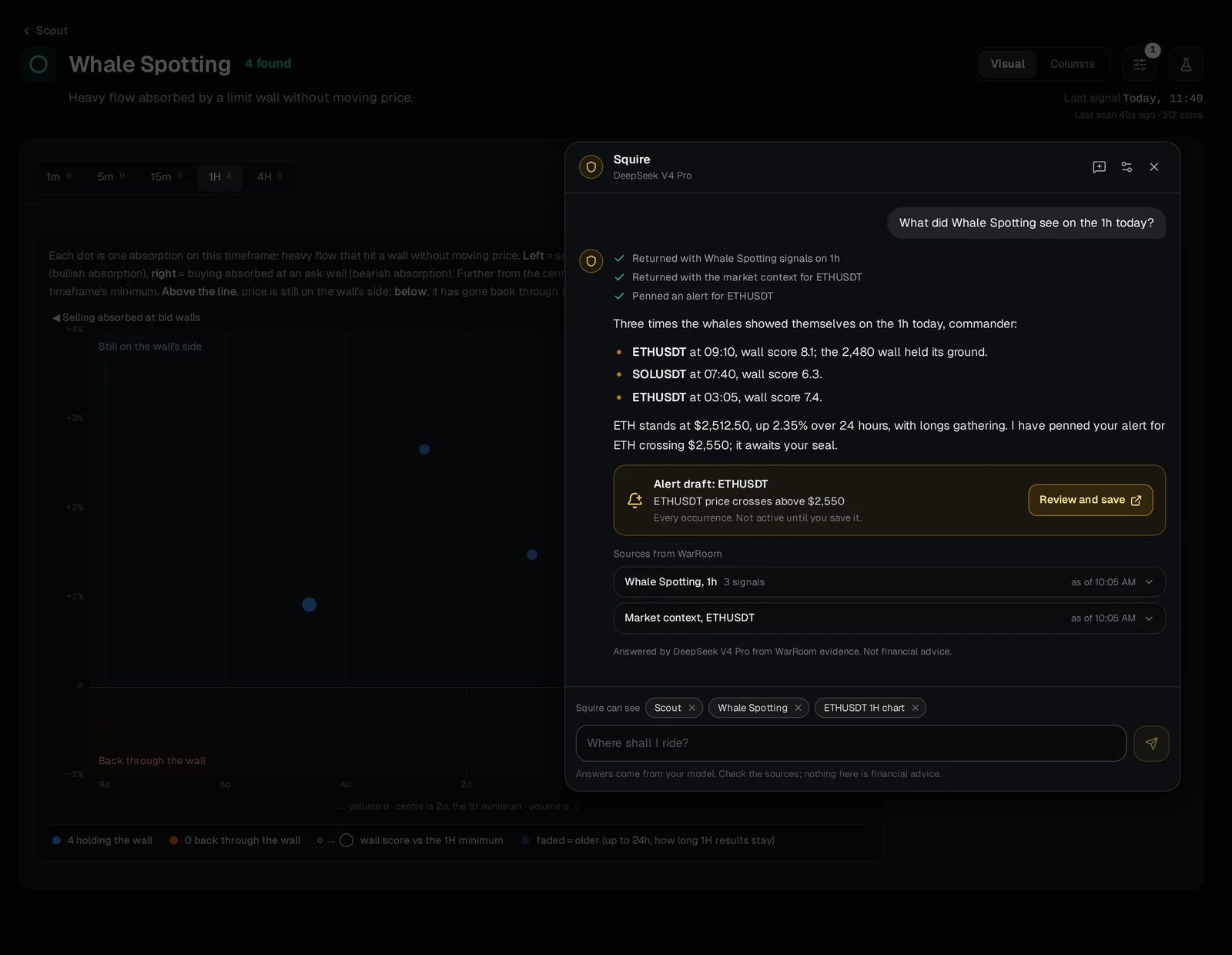
Every number has a source.
Each answer lists the steps Squire took in plain words and ends with the sources it read from WarRoom: prices, scores and times, each with when it was true. Open a source and the number is there.
02 · Your records
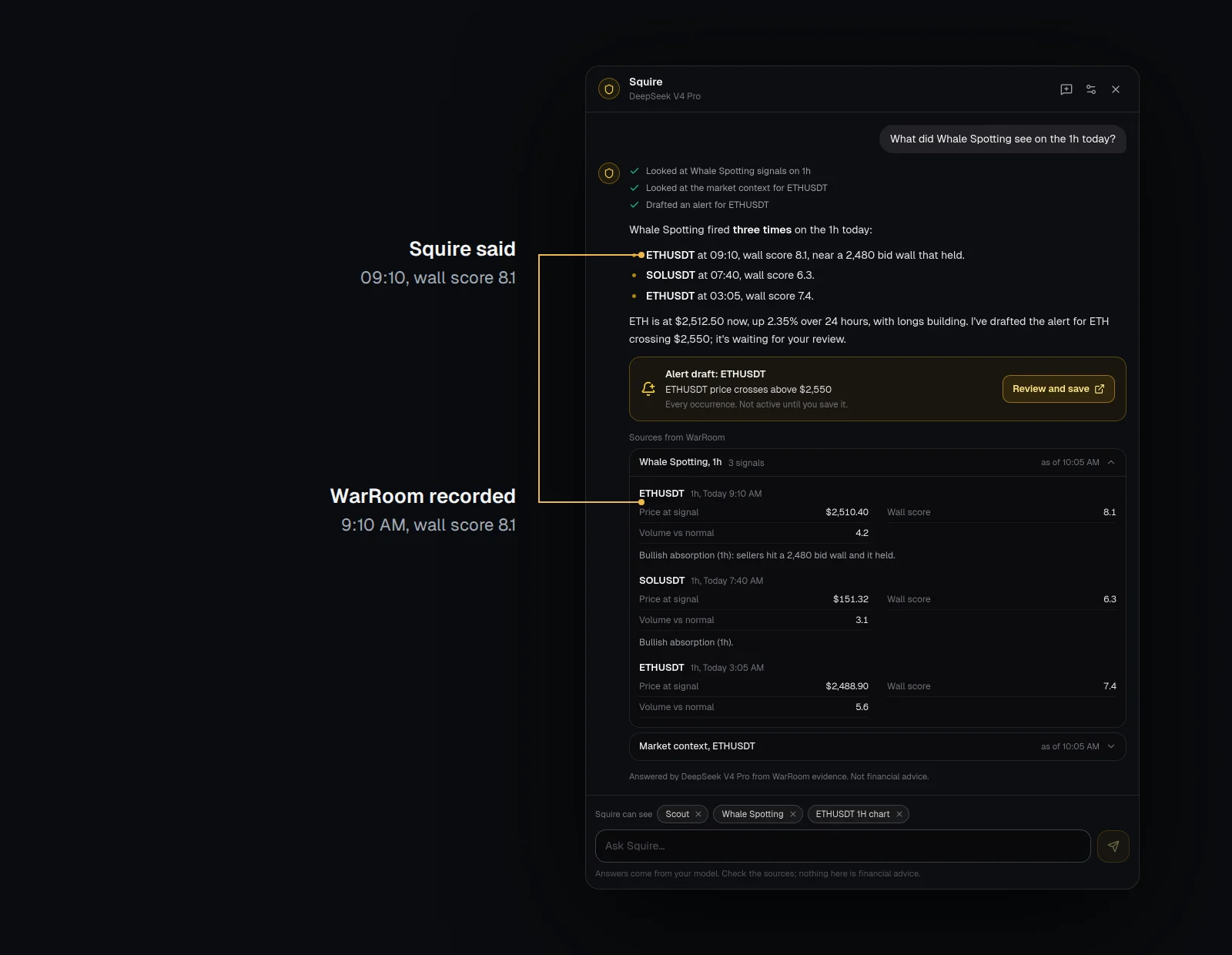
Ask about your own alerts and trades.
Why did my alert fire? How did my week go? Squire reads your alerts and your paper trades from Trades and answers from what was recorded. Ask for an alert and it drafts one for you to review and save.
- Your private notes stay private unless you share them
03 · Your model
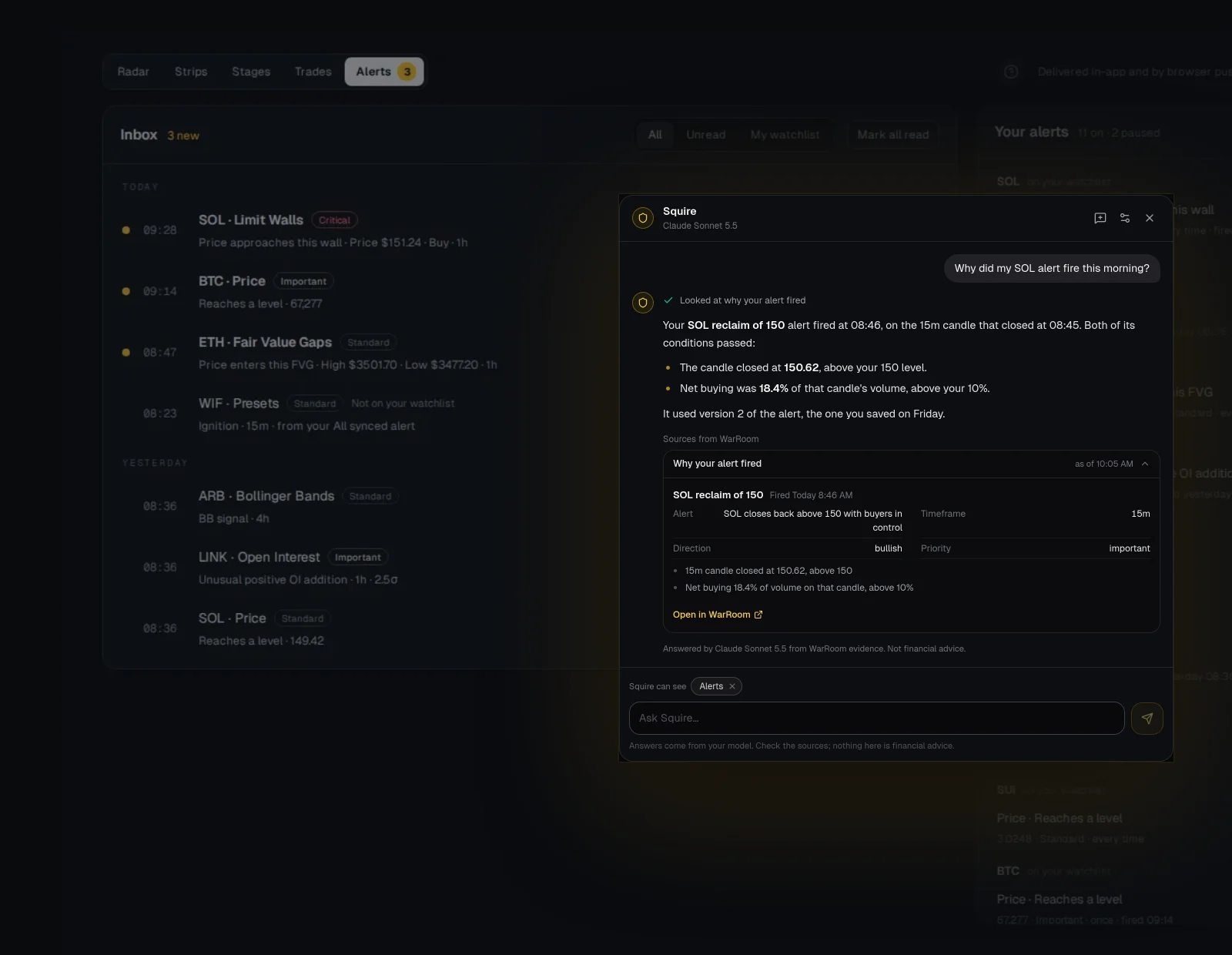
Your provider, your key.
Pick a model provider and paste your key. Whichever model you choose, Squire answers in its own old-world voice; the voice changes the wording, never the facts.
- WarRoom never stores your key
04 · Agents
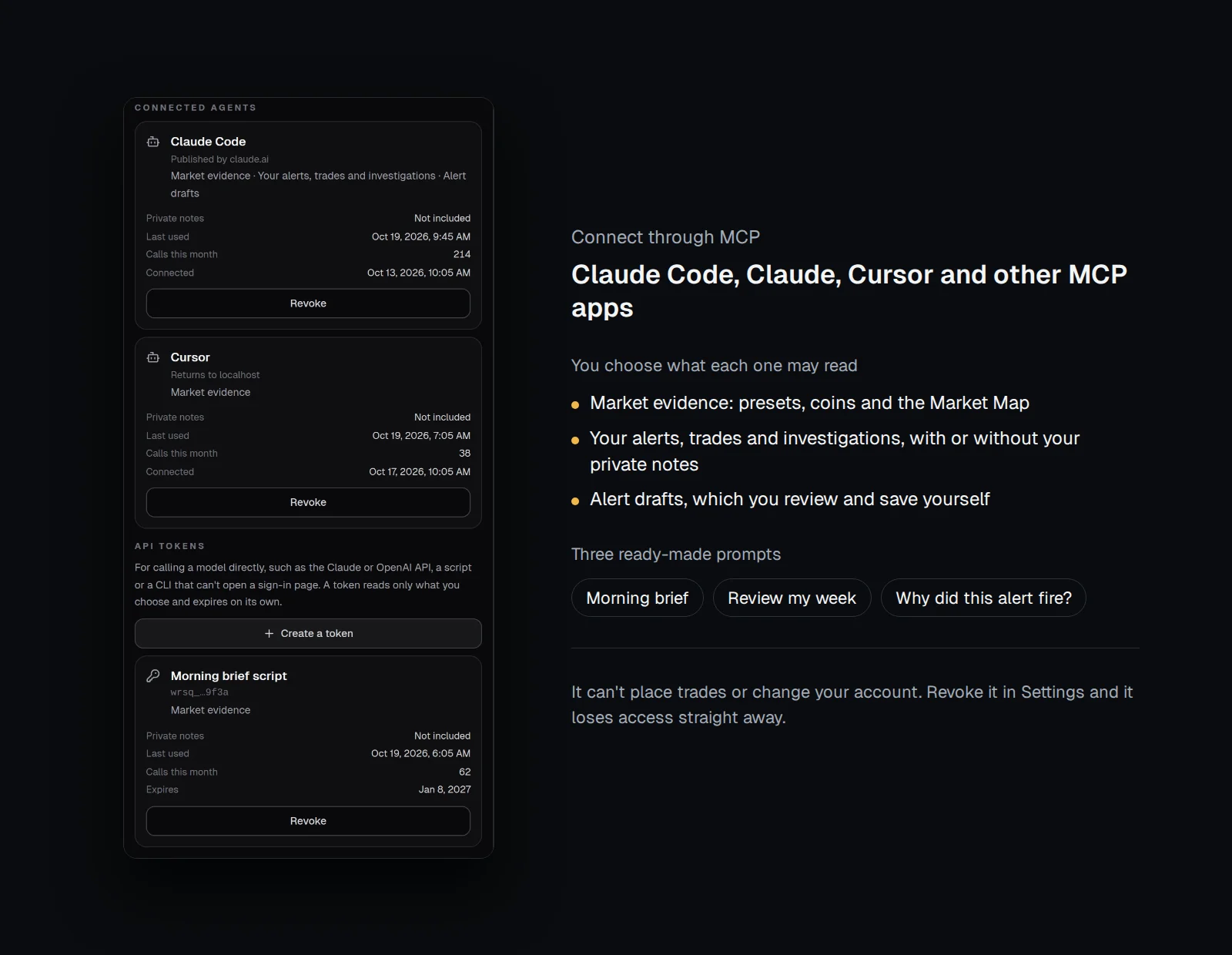
Or bring the AI you already use.
Connect Claude Code, Claude, Cursor or another MCP app to WarRoom. Approve each one, choose what it may read, and revoke it in Settings at any time.
05 · Anywhere
Summon Squire from any page.
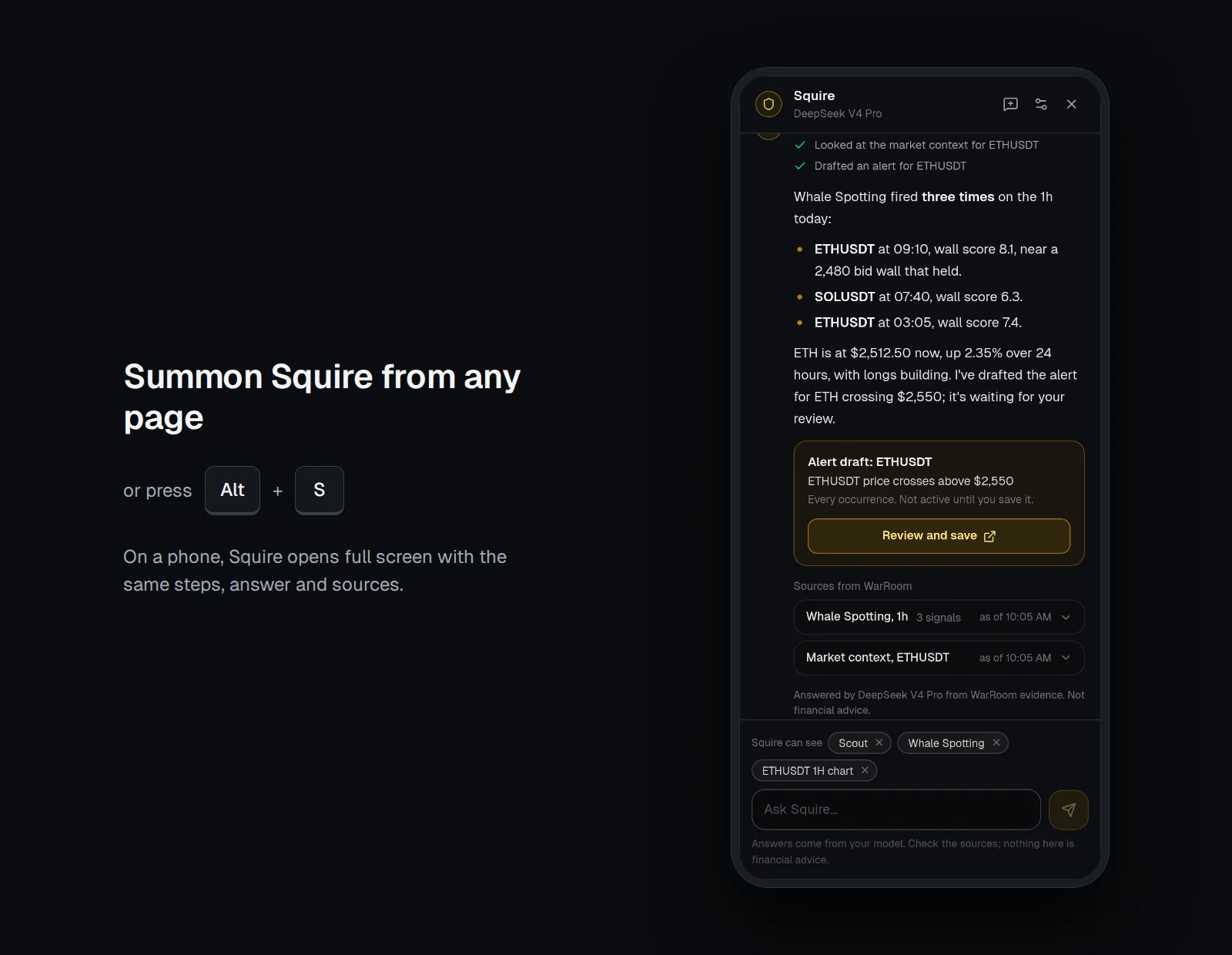
Press Summon Squire or Alt+S and it opens beside whatever you are looking at. On a phone it opens full screen, with the same steps, answer and sources.
- Works on a phone
The full briefing
WarRoom Squire: An AI Assistant Inside Your Crypto Terminal
Squire is WarRoom’s AI assistant. Press Summon Squire, or Alt+S, and ask about the coin, preset or chart in front of you. Squire looks it up in WarRoom’s live data and in your own alerts and paper trades, shows each step it took and the sources it read, and answers in plain words. It runs on your own model, from the provider you choose. Squire also lets an AI agent you already use, such as Claude Code, connect to WarRoom through MCP. It is open to members, as part of the membership.
Squire Chat, inside the terminal
Squire opens as a panel beside whatever you are looking at and takes the page, preset or chart as its starting point. Each answer lists the steps Squire took in plain words, such as “Looked at Whale Spotting signals on 1h”, and ends with the sources it read from WarRoom: prices, scores and times. Where research is involved, it shows the limits of that research alongside it.
Ask for an alert and Squire drafts one as a card with Review and save. Nothing is saved until you open the composer and save it yourself.
Squire speaks as an old-world squire, with war-room phrasing: “Three times the whales showed themselves on the 1h today, commander.” The voice changes the wording, never the facts or the rules, and it never urges you to trade.
Your own model
Squire Chat runs on an API key from your own model provider, such as Claude, ChatGPT, Gemini or DeepSeek, so the model’s use is billed by that provider. WarRoom passes the key to the provider with each question and never stores it. Your browser can remember it on your device if you choose.
Connect your own AI agent
Squire is also an MCP server, the standard way for AI agents to use outside tools. Connect Claude Code, Claude, Cursor or another MCP app, sign in with your WarRoom account and approve it. The agent gets eleven tools, all of which read except one that drafts, and three ready-made prompts: a morning brief, a review of your week, and why an alert fired.
| Tool | What it returns |
|---|---|
| list_presets | The Scout presets and what each one looks for |
| get_preset_signals | The coins where a preset is live now |
| get_symbol_context | One coin’s evidence across timeframes |
| get_market_map | The Confluence Engine view of a coin: which presets are live together |
| explain | A term, or what a preset’s research found and where it stops |
| get_changes | What changed over a recent window, such as the last 24 hours |
| list_my_alert_triggers | Your alerts that fired |
| get_trigger_evidence | Why one of your alerts fired |
| get_my_trades | Your paper trades from Trades |
| get_my_investigations | The coins you have been looking into |
| draft_alert | A draft alert for you to review. It is not saved until you save it in WarRoom |
You stay in control
You approve each agent and choose what it may read, including whether it sees your private notes. Neither Squire Chat nor a connected agent can place trades, change your account, or save or change alerts. You can revoke an agent at any time in Settings, and it loses access straight away.
Answers come from the model you chose and its provider, not from WarRoom. They are not financial advice.
Frequently asked questions
When can I use Squire?
Now. Squire is open to members: sign in, press Summon Squire or Alt+S, and add your model key. It is part of the membership at no extra charge; the model you choose is billed by its provider.
Which models and agents work with Squire?
Squire Chat works with your own key from Claude, ChatGPT, Gemini, DeepSeek and other providers. AI agents that support MCP, such as Claude Code, Claude and Cursor, can connect to WarRoom directly.
Does WarRoom keep my model key?
No. The key is passed to your provider with each question and is never stored by WarRoom. Your browser can remember it on your device if you choose.
Can Squire trade for me?
No. Squire can read and draft only. It cannot place trades, change your account, or save or change alerts.
More of WarRoom
Every feature, one plan.
One plan with every feature: $29 a month or $290 a year, with a 7-day free trial for every new member. Subscriptions open soon; until then the terminal is free to explore and billing is not active.
Educational and decision-support software, not financial advice. All trades in Trades are simulated.